

Tax Audit of Accounting and Point-of-Sale (POS) Systems
Data integrity, reliability and manipulation detection
01 – 12 March 2027 (Two Weeks Training)
Sandton
Johannesburg South Africa
Register Now! Limited Seats Available!
R39, 999.00 Per Delegate
Course Overview
The increasing use of digital accounting platforms, electronic invoicing systems and Point-of-Sale (POS) technologies has significantly changed how businesses record, process, store and report financial transactions. While these systems provide revenue authorities with access to large volumes of taxpayer information, they also introduce risks relating to data integrity, unauthorised alterations, transaction suppression and deliberate manipulation of accounting records.
Tax auditors must therefore develop the ability to assess not only the financial information submitted by taxpayers but also the systems and processes through which that information is generated. This includes understanding how accounting and POS systems operate, examining their configurations and internal controls, evaluating audit trails, reviewing user access rights and identifying whether transactions have been deleted, modified, backdated or suppressed before information is submitted to the revenue authority.
This 10-day specialised training programme is designed to equip tax auditors with the technical knowledge and practical investigative skills required to examine taxpayer accounting and POS systems, assess the reliability and completeness of electronic financial records, identify potential manipulation and establish whether system-generated information can be relied upon for tax audit purposes.
Course Objectives
By the end of the training programme, participants should be able to:
• Understand the architecture, functionality and operational processes of common accounting and POS systems used by taxpayers.
• Assess the reliability, completeness, accuracy and integrity of financial data generated by taxpayer systems.
• Examine system configurations, user permissions and access controls to identify opportunities for unauthorised changes or manipulation.
• Review electronic audit trails, transaction histories and system logs to identify deleted, modified, backdated or suppressed transactions.
• Detect common methods used to manipulate sales records, revenue figures, expenses and other financial information.
• Evaluate the effectiveness of internal controls within accounting and POS environments.
• Reconcile POS transactions with accounting records, bank deposits, electronic payment records, VAT returns and income tax declarations.
• Identify red flags indicating possible sales suppression, underreporting of revenue, fictitious transactions or manipulation of electronic records.
• Apply basic digital audit techniques to extract, examine, analyse and verify electronic accounting data.
• Determine when taxpayer-generated electronic records may be unreliable and identify the need for further forensic examination.
• Collect, preserve and document electronic audit evidence in a manner that supports tax investigations and potential dispute resolution.
• Prepare technical audit findings and recommendations based on identified system weaknesses and data integrity concerns.
Who Should Attend?
• Tax auditors and senior tax auditors.
• Revenue authority investigators and tax compliance officers.
• Digital tax audit specialists.
• Forensic auditors and forensic accountants.
• VAT auditors and indirect tax compliance officers.
• Corporate income tax auditors.
• Tax fraud investigation officers.
• Internal audit and risk assessment personnel within revenue authorities.
• Information systems auditors supporting tax audit operations.
• Revenue assurance and compliance monitoring officers.
• Financial intelligence and tax investigation specialists.
• IT professionals supporting digital tax audit and electronic records examination
Course Outline
Module 1: Understanding taxpayer accounting and POS systems
• Overview of modern accounting and financial management systems.
• Types of accounting software used by businesses.
• Understanding cloud-based, desktop and enterprise accounting platforms.
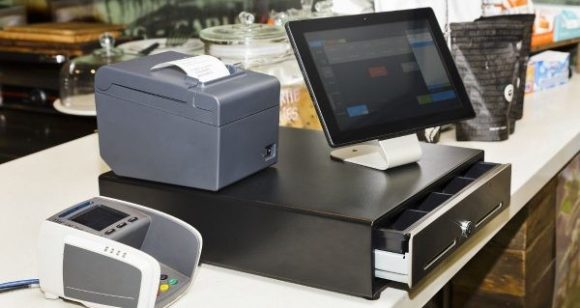
• POS systems: architecture, components and transaction processing.
• Integration between POS, inventory, accounting and banking systems.
• How sales, purchases, payments, refunds and adjustments are recorded.
• Understanding the flow of financial data from transaction capture to tax reporting.
• Common vulnerabilities in taxpayer accounting environments.
Module 2: Assessing the reliability and integrity of accounting data
• Understanding data integrity, accuracy, completeness and consistency.
• Evaluating the reliability of system-generated financial reports.
• Assessing whether accounting records reflect actual business transactions.
• Examining source documents against system-generated records.
• Reviewing transaction sequencing and numbering.
• Identifying missing, duplicated or inconsistent transactions.
• Assessing data completeness and identifying potential gaps.
• Verifying whether accounting records have been altered before submission to the revenue authority.
Module 3: POS system assessment and transaction verification
• Understanding POS transaction recording and processing.
• Assessing POS configurations and operational settings.
• Examining sales records, cash transactions and electronic payments.
• Reviewing refunds, voids, discounts and cancelled transactions.
• Identifying sales suppression and unrecorded transactions.
• Examining end-of-day reports and daily sales reconciliations.
• Comparing POS reports with accounting system records.
• Verifying POS sales against inventory movements and stock records.
• Identifying suspicious transaction patterns and unusual adjustments.
Module 4: User access controls and system configuration assessment
• Understanding user roles, permissions and access privileges.
• Evaluating administrator and supervisor access rights.
• Identifying shared accounts and unauthorised system access.
• Reviewing password policies and authentication controls.
• Assessing segregation of duties within accounting systems.
• Examining system configuration settings that affect transaction recording.
• Identifying unauthorised changes to financial records.
• Assessing controls over deletion, editing and reversal of transactions.
• Evaluating system change management procedures.
Module 5: Audit trails, system logs and detection of data manipulation
• Understanding electronic audit trails and activity logs.
• Examining transaction creation, modification and deletion histories.
• Identifying backdated transactions and unusual journal entries.
• Detecting changes made after financial periods have been closed.
• Reviewing administrator activity and system access logs.
• Identifying manipulation of timestamps and transaction references.
• Detecting deleted or suppressed sales transactions.
• Understanding methods used to alter accounting reports before submission.
• Recognising limitations where system logs can be disabled, altered or incomplete.
Module 6: Digital audit techniques and electronic data analysis
• Introduction to computer-assisted audit techniques (CAATs).
• Understanding electronic data extraction from accounting and POS systems.
• Reviewing data exports in Excel and other analytical formats.
• Applying data filtering, sorting and exception analysis.
• Identifying duplicate, missing and unusual transactions.
• Analysing transaction timestamps, user IDs and modification histories.
• Using analytical techniques to identify unusual sales patterns.
• Comparing electronic records across different systems.
• Introduction to data analytics for tax audit investigations.
Module 7: Reconciliation and cross-verification of taxpayer information
• Reconciling POS sales with general ledger balances.
• Comparing sales records with bank statements and payment gateway records.
• Verifying reported turnover against VAT returns.
• Comparing accounting records with income tax declarations.
• Reconciling inventory purchases, stock movements and recorded sales.
• Identifying discrepancies between cash sales and reported revenue.
• Examining electronic invoices and credit notes.
• Cross-verifying taxpayer records with third-party information.
• Developing a structured approach to transaction tracing.
Module 8: Identifying sophisticated accounting and POS manipulation techniques
• Common techniques used to suppress sales and underreport revenue.
• Manipulation of POS records through voids, refunds and cancellations.
• Use of unauthorised software modifications and hidden functions.
• Manipulation of accounting entries and journal adjustments.
• Alteration or replacement of electronic reports.
• Use of parallel accounting records and undeclared sales systems.
• Manipulation of inventory records to conceal unreported transactions.
• Identification of suspicious patterns and behavioural indicators.
• Case studies involving deliberate manipulation of digital financial records.
Module 9: Digital audit evidence, documentation and reporting
• Identifying and collecting relevant electronic audit evidence.
• Preserving original electronic records and maintaining data integrity.
• Evidence handling, documentation and chain of custody.
• Working with system administrators and external IT specialists.
• Documenting system weaknesses and control failures.
• Preparing technical findings on unreliable taxpayer records.
• Establishing the evidential basis for adjustments to reported income.
• Communicating findings to taxpayers and responding to technical explanations.
• Preparing audit reports and recommendations for further investigation.
Module 10: Practical system assessment, case studies and competency assessment
Practical exercises:
• Assessing a simulated taxpayer accounting system.
• Examining a sample POS transaction database.
• Reviewing user access permissions and system configurations.
• Analysing audit trails to identify altered or deleted transactions.
• Identifying suspicious refunds, voids and cancelled sales.
• Reconciling POS sales against accounting records and bank deposits.
• Detecting discrepancies between original records and submitted reports.
• Determining whether the taxpayer’s electronic records can be relied upon.
Final assessment:
• Practical system assessment exercise.
• Identification of data manipulation indicators.
• Preparation of a technical tax audit findings report.
• Presentation of findings and recommendations.
• Individual competency assessment.
End of the workshop
IN HOUSE AND ONLINE TRAINING

While both In-House and Online training can present with cost-effectiveness and time-efficacy, there are some very specific differences between in-house courses and those based online.
The demand for additional courses by individuals or groups of people is increasing. Still, it depends entirely on the preferences of a person what type of training he or she wants to receive. Online courses and in-house training carry some similarities but they are considered to exhibit some very pivotal differences too. Despite that, both types of learning can be really beneficial for attendees.
For Registration and other Training arrangements,
contact us on the detail below.
SOUTH AFRICA : +27 11 057 6001
TANZANIA Cell: +255 687 839 269
WhatsApp +27 82 360 1372 / +27 79 574 0389
info@bmktraining.co.za / www.bmktraining.com
